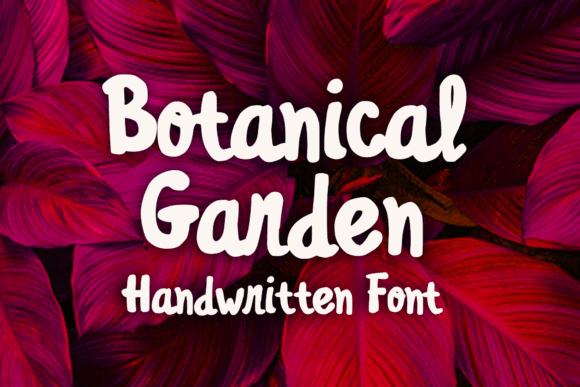
Botanical Garden Font Review
As a web designer, I always look for fonts that bring personality without sacrificing usability. Botanical Garden fits the bill perfectly. It’s a bold and playful script font that adds a touch of whimsy to any digital project. I tested it on a few real-world layouts, from hero sections to call-to-action buttons, and found it to be both expressive and functional.
Botanical Garden in Action: A Hero Section Test
I started by using Botanical Garden in a hero section for a boutique online store. The font’s fluid curves and strong strokes made it stand out against a clean background. It worked especially well as the headline, drawing attention without overwhelming the design. I paired it with a simple sans serif for the body text, which created a nice balance between creativity and readability.
The font’s weight and spacing allowed it to scale well on different screen sizes. On mobile, it remained legible even when reduced to smaller sizes. I noticed that the swashes and ligatures added a subtle elegance that felt natural rather than forced.
Using Botanical Garden for Call-to-Action Buttons
Next, I tried Botanical Garden on a CTA button for a course sales page. The font’s boldness made it ideal for short phrases like “Join Now” or “Start Today.” It had enough character to feel unique but wasn’t so ornate that it distracted from the message.
On dark backgrounds, the font held up well, maintaining contrast without looking harsh. On light backgrounds, it still popped without being too aggressive. I found that adding a slight drop shadow helped it stand out more in image overlays, making it a great choice for banner designs.
Botanical Garden in Portfolio and Branding Projects
For a creative portfolio site, I used Botanical Garden as the heading for the “About Me” section. Its handcrafted feel aligned with the personal and artistic nature of the content. It gave the page a warm, inviting tone that matched the brand’s identity.
I also tested it in a digital brand kit, where it served as the logo font. The font’s structure allowed for easy customization, and its alternates provided flexibility for different applications. Whether used in a logo, social media graphics, or email headers, Botanical Garden maintained a cohesive look across platforms.
Readability Considerations for Web Design
While Botanical Garden is highly readable in short phrases and headings, it’s not ideal for long paragraphs. I wouldn’t recommend using it for body copy on a blog or e-commerce product description. The intricate details can become difficult to read at smaller sizes, especially on low-resolution screens.
For accessibility, it’s best to pair it with a clean, neutral font for navigation menus, form labels, and other interface elements. That way, the decorative aspects of Botanical Garden can shine in areas where they’re most effective, like headlines and visual accents.
Font Pairing Tips for Web Projects
When working with Botanical Garden, I found that pairing it with a simple sans serif or serif font enhanced the overall design. For example, using a modern sans serif like Open Sans for body text created a clear visual hierarchy while letting the script font take center stage in key areas.
If the goal is a more editorial feel, a classic serif like Georgia or Playfair Display can add sophistication. For a minimalist approach, a clean sans serif like Lato or Roboto works wonders. The key is to let Botanical Garden be the star of the show in display areas while keeping the rest of the typography straightforward.
Final Thoughts on Botanical Garden for Web Use
Botanical Garden is a versatile and expressive font that brings energy and charm to web projects. It excels in hero sections, CTA buttons, logos, and other visual elements where a bold, stylized look is needed. However, it’s important to use it wisely—reserving it for short, impactful text rather than lengthy content.
For web designers and digital creators, Botanical Garden offers a fresh alternative to more common script fonts. Its combination of playfulness and professionalism makes it a valuable addition to any design toolkit. Just remember to test it thoroughly across different devices and contexts to ensure it meets your project’s needs.