Gingerstraw: A Handwritten Font for Web Design
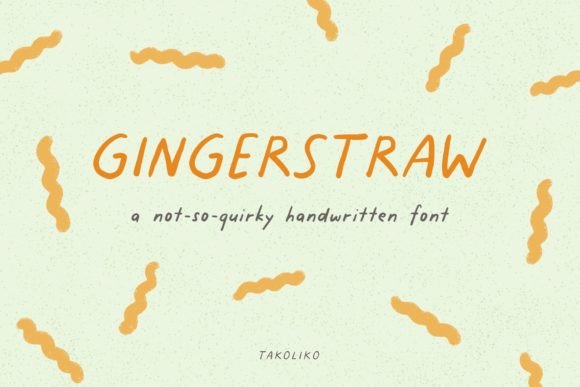
Gingerstraw is a warm, cheerful handwritten font that brings personality to digital projects. As a web designer, I look for fonts that add character without sacrificing clarity. Gingerstraw fits that need perfectly, offering a handmade feel that works well in both modern and creative contexts.
With its subtle irregularities and friendly strokes, Gingerstraw feels authentic. It’s not overly ornate, which makes it ideal for headers, logos, and short phrases where readability is key. The font’s natural flow gives it a human touch, making it stand out in a sea of rigid typefaces.
Using Gingerstraw in Web Design
Gingerstraw excels in visual hierarchy. Its distinct shape helps draw attention to important elements like hero section headlines, call-to-action buttons, and brand tags. When used strategically, it can guide users through a page while maintaining a cohesive design language.
For example, on a creative portfolio site, Gingerstraw can be used for the project title or artist name. It adds a personal, artisanal vibe that complements the work being displayed. On a boutique online store, it can appear in banners or product headings, reinforcing a unique brand identity.
In landing pages, Gingerstraw works best as a display font. Pairing it with a clean sans serif for body text creates a balanced layout. This contrast helps maintain readability while allowing the font to shine in key areas.
Readability and Responsive Layouts
When using Gingerstraw on mobile screens, it’s important to keep text sizes generous. The font’s curves and flourishes can become less legible at smaller sizes, especially on dark backgrounds or image overlays. For buttons or short labels, it’s best to use larger point sizes and ensure sufficient contrast.
On responsive websites, Gingerstraw should be used sparingly. Too much text in this style can disrupt the flow and make content harder to scan. Limiting its use to headers, logos, and decorative accents ensures it enhances the design without overwhelming the user.
Brand Tone and User Engagement
The personality of Gingerstraw aligns well with brands that want to convey approachability and warmth. It’s perfect for coaching websites, wellness apps, or educational platforms looking to build trust through visual storytelling. Its soft, inviting appearance can make a brand feel more relatable and human.
For SaaS founders or online store owners, Gingerstraw can be a powerful tool in creating a consistent visual identity. When used across landing pages, social media graphics, and email templates, it reinforces brand recognition and strengthens the overall aesthetic.
Font Pairing and Design Assets
Gingerstraw pairs well with sans serif and serif fonts. A simple, neutral typeface like Open Sans or Lora can provide a strong foundation for body copy, while Gingerstraw adds flair to titles and highlights. This combination is ideal for editorial designs, blog headers, and course sales pages.
For a more sophisticated look, pairing Gingerstraw with a classic serif font like Georgia or Playfair Display can create an elegant, professional feel. This works well for branding materials, packaging design, or high-end digital products.
Commercial Licensing and File Formats
Before using Gingerstraw in client projects or commercial websites, check the licensing terms. Most premium fonts include webfont licenses for embedding in sites, but it’s important to confirm availability in formats like WOFF or TTF. Some fonts also offer multiple weights or alternates for greater flexibility.
If you're building a digital brand kit, Gingerstraw can be part of your typography system. Including it in your design assets ensures consistency across all platforms, from website headers to social media posts. Always verify multilingual support if your audience speaks multiple languages.
Practical Applications for Digital Creators
For bloggers, Gingerstraw can elevate blog headers and featured images. It adds a personal touch that makes content feel more engaging. For marketers, using it in ad creatives or email subject lines can catch attention and encourage clicks.
UI designers will find Gingerstraw useful for buttons, icons, and micro-interactions. Its expressive nature can make interactive elements more memorable. For app screens, it works best in non-critical areas, such as tooltips or decorative elements, to avoid cluttering the interface.
Whether you're designing a course sales page, a portfolio site, or a digital template, Gingerstraw offers a versatile solution. Its balance of style and readability makes it a valuable addition to any designer’s toolkit.
As a web designer, I appreciate fonts that adapt to different contexts without losing their character. Gingerstraw does exactly that. It’s a reliable choice for anyone looking to add warmth and personality to their digital projects.