Lillie: Elegant Script Font for Web Design
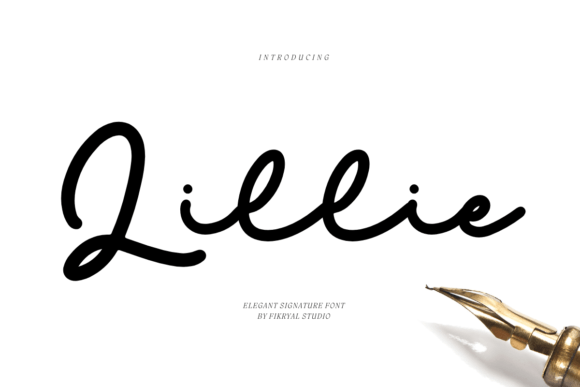
Lillie is a signature script font that brings a touch of luxury to any digital project. As a web designer, I look for fonts that not only enhance visual appeal but also support usability and brand identity. Lillie fits perfectly into this vision, offering a refined style that works well in headers, logos, and decorative elements across websites and digital interfaces.
Designed with a flowing, handwritten feel, Lillie adds a personal and artistic touch to web design. Its curves and fluidity make it ideal for creating a sense of elegance and sophistication. Whether you're working on a creative portfolio site or an online store, Lillie can help define the tone and personality of your brand.
Using Lillie in Web Design Projects
One of the most effective ways to use Lillie is in hero sections and header areas. Its readability at larger sizes makes it perfect for headlines that grab attention. When paired with a clean sans serif font for body text, Lillie creates a strong visual contrast that enhances readability and guides users through the content.
In landing pages, Lillie can be used for call-to-action buttons or section titles. It adds a stylish flair without overwhelming the design. For example, a boutique online store might use Lillie for product headings or promotional banners, giving the site a more curated and premium feel.
On coaching or course sales pages, Lillie can be used for subheadings or key benefits. Its elegant appearance supports a professional and trustworthy brand image. Similarly, in blog headers or social media graphics, Lillie can serve as a focal point that draws readers in and reinforces the brand's aesthetic.
Readability and Visual Hierarchy
While Lillie is a display font, its legibility at larger sizes makes it suitable for headings and short phrases. However, it's best avoided for long blocks of text due to its intricate details. When using Lillie in web design, consider the context and size to ensure it remains readable across different devices.
On mobile screens, Lillie works well for headers and CTA buttons, provided the font size is large enough. On dark backgrounds or image overlays, it maintains clarity without losing its stylistic appeal. For smaller text, such as footers or captions, it’s better to switch to a simpler typeface for optimal readability.
When designing for responsive layouts, test Lillie at various screen sizes to ensure it scales well. Its fluid strokes may appear slightly different on smaller screens, so adjust spacing and line height accordingly to maintain visual balance.
Font Pairing and Brand Identity
Lillie pairs beautifully with modern sans serif fonts for a balanced and professional look. A simple, clean font like Roboto or Open Sans complements Lillie’s ornate style, making it easier to read while maintaining a cohesive design language. This pairing works especially well for SaaS websites, editorial blogs, or e-commerce platforms.
For a more traditional or editorial feel, pair Lillie with a serif font like Georgia or Playfair Display. This combination evokes a sense of timelessness and refinement, ideal for lifestyle brands, fashion sites, or high-end product showcases.
When building a brand identity, consistency is key. Use Lillie for logo text, website headers, and marketing materials to create a unified visual presence. This helps reinforce brand recognition and ensures a cohesive experience across all touchpoints.
Practical Applications of Lillie
Consider using Lillie for a creative portfolio site where visual storytelling is essential. Its flowing lines can add a personal touch to project titles or artist bios. In a digital brand kit, Lillie can be used for social media posts, email templates, or print materials, ensuring a consistent and polished look.
For an online store, Lillie can elevate the design of product banners, category headings, or promotional messages. It adds a unique and memorable element that sets the brand apart from competitors. Similarly, in a blogging platform, Lillie can be used for post titles or featured sections to draw attention and encourage engagement.
When designing a coaching or educational website, Lillie can be used for course titles, testimonials, or feature highlights. Its elegance conveys professionalism and trust, which is crucial for user confidence and conversion rates.
Commercial Licensing and File Formats
Before using Lillie in a commercial project, check the licensing terms. Most premium fonts include webfont licenses for use on websites, landing pages, and digital products. Ensure the license covers your intended use, whether it's for your own site or a client project.
Lillie typically comes in multiple file formats, including OTF and TTF, and often includes webfont versions for easy integration. Check if the font offers alternate characters or ligatures, as these can add variety and customization options for your designs.
Support for multilingual characters is important if your audience speaks different languages. Confirm that Lillie includes glyphs for the languages you need to ensure proper display across all regions and platforms.
As a digital creator, I rely on fonts like Lillie to bring my design concepts to life. Its blend of elegance and functionality makes it a valuable addition to any web design toolkit. Whether you're building a new website or refining an existing brand, Lillie can help you achieve a polished and professional look that resonates with your audience.